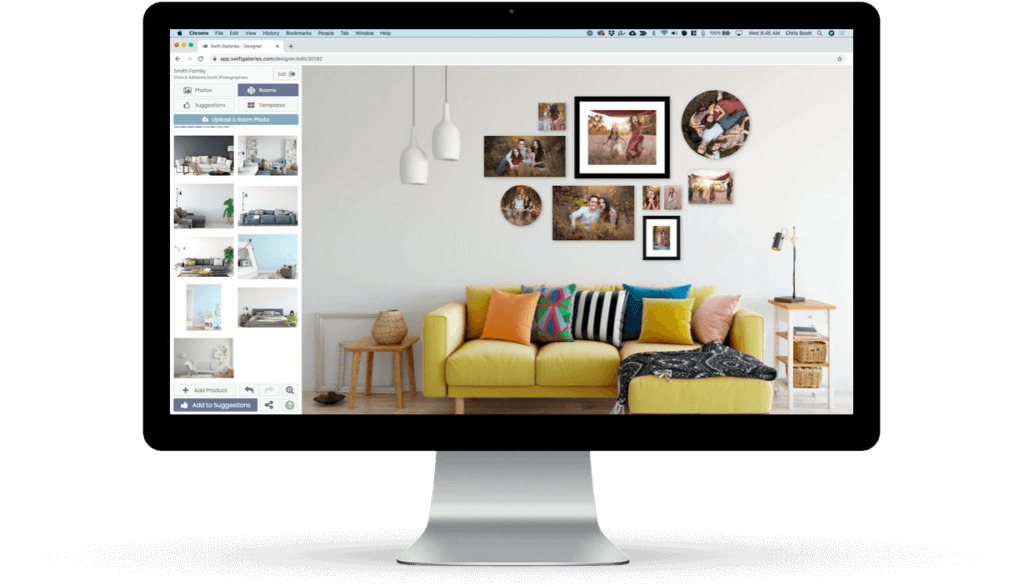
Say hello to your handheld sales room.

Your clients' images.
On their walls.
At the right size.
On your iPad.

About Us

Preveal was founded by Chris & Adrienne Scott, a husband and wife photography team who have a heart for helping fellow photographers run profitable, sustainable businesses.
They live in Denver, CO with their daughter, Madison, and a Boston Terrier named Wilson.

Chris

The Idea Guy

Adrienne

Voice of Reason

Randy

Code Ninja

Kate

Queen of Support

Why Preveal?

Portable Sales Room

Preveal changed the game by being the first to bring the power of the projection sales room to the iPad in the palm of your hand.

Killer Price Point

At only $74.99, you should make enough in your first sale with Preveal to pay for the app and the iPad it's on. We have.

None of the Fat

We're intensely focused on one thing and one thing only - making it as easy as possible for you to sell large wall art to your clients.

Blazing Fast

Simply stated, you've never created a wall collection of your clients' images on their walls, at the right size, this quickly before.

Personalized Support

We're a small team that is passionate about providing one-on-one support in order to keep our customers thrilled with Preveal.

No Training Necessary

With an intuitive and simple workflow, Preveal will have you up and running without having to shell out money and time for a training class.

Screenshots

Selling large portraits and collections is as simple as setting the room image, swiping to find the perfect wall collection, showing the clients their images in that collection and sharing via social media or email!

Preveal Home Screen
Preveal Set Room Image
Preveal Choose Collection
Preveal Choose Client Image
Preveal Share Wall Art

Updates

Version 2.0

Released on January 19th, 2013
  • New Added our first Premium Templates - Design Aglow Inspire Guide: Canvas
  • New Added 70+ free user-requested templates
  • New Completely redesigned user interface for refined aesthetics and workflow
  • New Redesigned Manage Templates screen to help you work faster
  • New Templates are now grouped for streamlined template management and workflow
  • New Choose "favorites" for quick access to your most popular templates
  • New Share created wall galleries via Facebook and Twitter
  • New Added ability to rotate collection templates
  • New Other small refinements to make using Preveal more simple and efficient

Version 1.2.1

Released on October 26th, 2012
  • New Hidden templates appear grayed-out in Manage Templates grid view
  • Fix Fixed bug where all prices weren't displayed in shared email

Version 1.2

Released on September 14th, 2012
  • New Now includes free templates from ProDPI
  • New Ability to add multiple print types and prices
  • New Added ability to hide templates you don't wish to sell
  • New Added ability to save created wall art to the iPad's Camera Roll
  • New Added ability to rotate single image templates

Version 1.1

Released on July 30th, 2012
  • New Includes 41 free templates
  • New Added templates from Bay Photo Lab
  • New Tweaked to support foreign currencies
  • Fix Streamlined Manage Template screen
  • Fix Improved image quality on shared templates

Version 1.0

Released on July 26th, 2012
  • New Initial release for iOS

Testimonials

  • "Downloaded and used this app on Friday and more than quadrupled my normal sale! Largest sale from a family session to date! This app MORE than pays for itself on it’s first use! This is going to revolutionize the way photographers sell their products! Preveal has been by far the best investment I’ve made this year for my business! I’ve used other wall portrait guide viewing systems before and this app beats them hands down! The process is easier and the outcome is stunning. Clients have been in awe at the visuals I am able to produce, and in turn have been more eager than ever to place large portrait orders. You’ve heard the saying, “If you want to sell it, you have to show it” . Well, I’ve shown it, and sold it! Preveal made back the cost of the app, the iPad it was on, +7 more iPads in just one ordering session! This is the WOW factor every studio needs!"

    Julie Nabors Jewels Avenue Photography →
  • "I have never been into selling clusters but have been thinking about it. The first sale I had after purchasing Preveal was amazing! My clients had me design multiple walls after seeing the first set I made for them. It was great to see their excitement over seeing images on THEIR wall. All they bought were clusters. This app is a game changer for me."

    Ann Keen Ann Keen Photography →
  • "Everyone knows that to help our clients envision what’s possible on their walls, you have to show big to sell big. Well, now I can do both… anywhere, anytime. As a portrait photographer, Preveal is the truly mobile solution I have been waiting for."

    Dane Sanders Dane Sanders Photography →
  • "After struggling for the last two years to get my clients to see beyond the disc and small prints during my in home “Portrait Premier Session,” I was one of the first to download Preveal! As a matter of fact, I waited weeks for the release, checking the blog daily for the news. In 3 days and 3 Senior Portrait Premier Sessions, I have managed to sell a total of $6,400 in product, with the bulk of the product being clusters using the Preveal App! I have heard of photographers struggling with the price of the app download and if this is you, take it from me. . . My $6400 in sales paid for my App 50 times and purchased me a couple iPads. I hope everyone sees the value in Preveal as an investment in their business. Thank you Preveal for making this girl some major money!"

    Leah Hoskins Epic Photography →
  • "I had my first ordering session using Preveal this morning. Not only was my client super impressed with the app, she spent more than triple my average family portrait sale, and was thanking me profusely as I walked out the door! This is such an amazing tool to add to my sales line up — thank you!"

    Amy Shertzer Amy Shertzer Photography →

Contact Preveal

We check and respond to time-sensitive email at 11am and 4pm, Monday through Thursday.
We respond to all other messages on Fridays at 11am, when a response is necessary.


Fill out my online form.

Frequently Asked Questions

  • Problems?

    Having a problem with Preveal?  This is probably your answer.


    I’ve set up Dropbox in Preveal, but all I’m seeing is a blank white screen when I click the Dropbox button.

    • What you’re seeing is not actually a blank screen, but your brand-spankin’ new, empty folder at Dropbox > Apps > Preveal.  Just drop some images in there (see the image size recommendations in the next point) and enjoy the Dropbox-y goodness. Still stuck? Check out the “Setting up Dropbox in Preveal” tutorial video over on the Resources and Tutorials page.
    Preveal keeps crashing when I’m almost finished putting images in a template from Dropbox! Why does it hate me??
    • If Preveal has crashed while you’re filling image templates, chances are you’re using full resolution or high resolution images. We recommend sizing your images to 900px on the short edge at 72 dpi. Feel free to experiment with other sizes to find the right fit for your workflow and presentation preferences, but the main point is, don’t use high resolution images. If you’re a Lightroom user, check out the export preset we’ve created for you on the Resources page.

  • Frequently Asked Questions

    Where can I get Preveal?

    Wait… $75?  But everything else is $.99 in the App Store!

    • Let’s take Preveal out of the 99 cent App Store world for a minute and put this in the context of the prices we all pay for the tools we use in running a professional photography business.  Photoshop – $700.  ProSelect – $400-$700.  ShootQ – $40-$80/ month.  Successware – $50/month.  Totally Rad Action Set – $150.  That doesn’t even begin to look at the actual tools of the trade when it comes to camera equipment, conference and professional association fees and that adorable lens bag or camera strap you just bought.  Preveal is $75, which is a fantastic price for a tool you’ll use in running a professional photography business; a tool that will pay for itself time and time again with each use.

    Is it available on Android (iPod, iPhone, Computers, something other than my iPad)?

    • We’re directing all of our resources toward the iPad app at this point.  With that said, we’ve got plans for something bigger than this down the road that will be available on all platforms, we just need to get Preveal perfected first.

    Will it work on iPad1?

    • For the most part, yes.  Obviously, the camera-related features will not.  To accomodate the lower amount of memory in the iPad1, we recommend sizing your client session images to 900px on the short end at 72 DPI.  We recommend this for all iPad versions, actually.

    Can I create my own templates?

    • Not yet, but that’s right at the top of our list of features.

    How do I calibrate Preveal to show my images at the right size on my client’s wall image?

    • Calibrating Preveal to your wall image is simple, all you have to do is take a horizontal picture of a standard “letter” size piece of paper (8.5″x11″) on the wall with the iPad2 or the new iPad or import one from Dropbox or your iPad’s Photo Album.  From there, you pinch and pull the box until it’s the same size as the piece of paper on your wall.  You’re ready to show the templates on your client’s wall at the right size!  For more info, please see the “Preparation” section of this help documentation below.

    I don’t have any images of my client’s walls, what can I do?

    • We’ve provided a few of the stock room images we’ve been using for our demos, available for download from the resources page.
    Can I use a vertical image of my client’s wall in Preveal?
    • In order to take advantage of as much side-to-size screen space (since the majority of templates are wider than they are tall), Preveal only uses horizontal wall photos.  Be sure to take this into account when photographing your client’s wall, or asking them to provide wall images.
    Do I need an internet connection to use Preveal?
    • Nope, you just need to plan ahead a little more and be sure that you’ve synced your client’s images to your iPad through iTunes before you begin your sales session.

    What collection and single image templates are included in Preveal when I purchase it?

    Can you help me price my templates?
    • Why yes… yes we can.  Check out the calculator on the Resources page.  It’s a good way to get yourself a ballpark idea of where you should be in order to price profitably.  Use it as a guide and adjust accordingly.
    Sweet resources… what else is available?
    • In addition to the Lightroom plugin and pricing calculator, we’ve got an order form you can use and some stock room images you can use in Preveal in the event that you don’t have a photo of your clients’ room as well as a link to a great resource that Design Aglow has created exclusively for Preveal users.  Check them all out on the Resources page.

    I’m interested in cross-marketing with Preveal, who should I contact?

    • We would love to discuss a marketing relationship with you!  Please send an email to Chris at hello@getpreveal.com and include your company name, contact info, average blog readership, facebook fans or email readership and what kind of cross-marketing plan you have in mind.